 contextlake
Architecture & internals
How all three layers work inside, the store, concurrency, branch selection, extraction, and the offline boundary.

Deep-dive companion to the README: how the core sync and the knowledge layer work under the hood.
Core sync internals#
Architecture#
The tool is built as a modular Python CLI application with the following components:
Configuration System#
The tool uses a hierarchical configuration system with the following precedence:
-
Configuration Files (using Python's
configparser): - Local config:.contextlake.iniin current directory - Global config:~/.contextlake.iniin home directory - Custom config: Specified via--configCLI argument -
Default Values: Built-in defaults for all settings
-
CLI Arguments: Override all other settings
Configuration loading flow, load_config() merges each layer over the one
before it, so the most specific source wins:

Core modules#
The sync core is plain Python (stdlib only). Its functions group by responsibility, each command in the Usage guide maps onto one group:
| Responsibility | What it does |
|---|---|
| Config | Load and merge INI files (local / global / custom), expand ~, resolve cache paths. |
| Discover | fetch accessible GitLab projects (via glab, filtered by group prefix, archived dropped) and cache them; enumerate local .git repos. |
| Clone | Clone missing repos concurrently (ThreadPoolExecutor, max_workers), creating namespace parents, with per-op timeouts. |
| Update | Fetch + fast-forward each repo's current branch concurrently, handling detached HEAD. |
| Branches | Rank each repo's branches by git rev-list --count and switch to the most active (subject to branch safety). |
| Verify / status | Compare local vs GitLab, detect nested .git, report missing / extra / synced. |
| CLI | main() loads config, parses args (CLI overrides config), and dispatches to a command handler. |
Data flow#
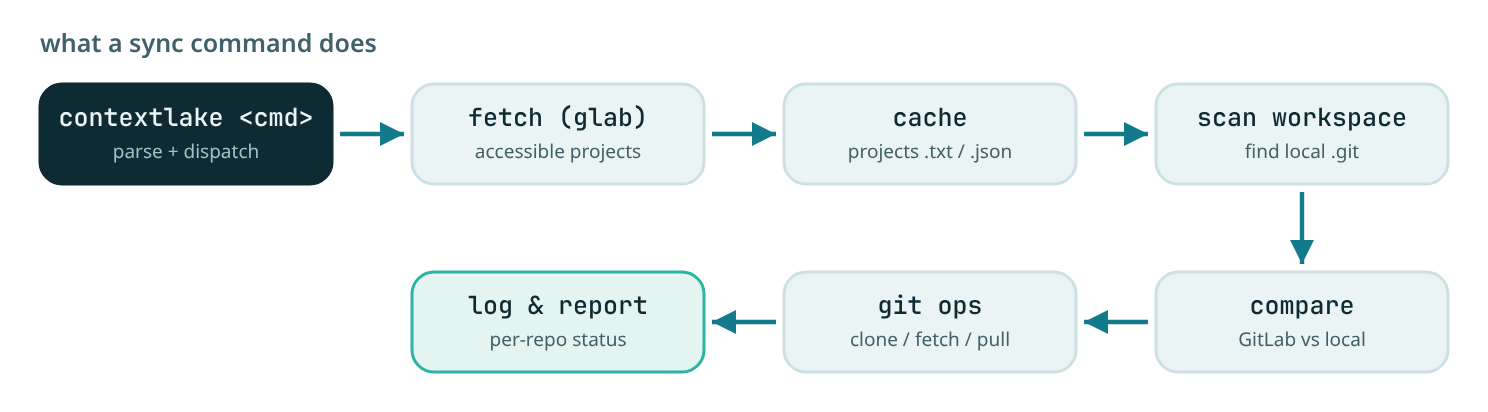
Concurrency Model#
The tool uses Python's ThreadPoolExecutor for concurrent operations:
- Cloning: 8 parallel workers
- Updating: 8 parallel workers
- Branch Switching: 8 parallel workers
Each worker operates independently with its own timeout:
- Clone operations: 300s timeout
- Fetch operations: 60s timeout
- Branch operations: 30s timeout
- Pull operations: 60s timeout
Error Handling#
The tool implements comprehensive error handling:
- Timeout Handling: All subprocess calls have explicit timeouts
- Exception Catching: All functions catch and report exceptions
- Status Reporting: Operations return status tuples for tracking
- Graceful Degradation: Failed operations don't stop the entire process
- Detailed Logging: All errors are logged with context
Cache Management#
The tool uses two cache files:
/tmp/gitlab_projects.json
- Full JSON response from GitLab API
- Used for debugging and detailed inspection
- Contains complete project metadata
/tmp/gitlab_projects.txt
- Pipe-delimited format for faster loading
- Format:
path_with_namespace|ssh_url|http_url|default_branch|archived - Primary data source for all operations
Cache is refreshed by running the fetch command or sync (which includes fetch).
Branch Selection Algorithm#
To identify the most active branch the tool:
- Fetches all branches with
git for-each-ref(collecting each branch's last commit date) - Calculates commit count per branch via
git rev-list --count origin/branch - Scores and ranks branches according to
branch_strategy - Switches to the top branch (and pulls) if it differs from the current one
The branch_strategy setting controls step 3:
commits, rank purely by commit count (legacy behaviour)recency, rank purely by most recent commithybrid(default), a weighted blend of normalized commit count and recency, so a branch that is both busy and recently active wins; this avoids picking a long-lived branch that has gone stale, or a brand-new branch with few commits
Branch switching is skipped entirely for repositories checked out on a working branch (see Branch Safety).
Directory Structure Mapping#
The tool maintains GitLab's exact directory structure:
GitLab Path: your-gitlab-group/backend/services/api-gateway
Local Path:  backend/services/api-gateway

GitLab Path: your-gitlab-group/backend/pricing/quote-engine
Local Path:  backend/pricing/quote-engine

GitLab Path: your-gitlab-group/frontend/platform/ui-toolkit
Local Path:  frontend/platform/ui-toolkit
The your-gitlab-group/ prefix is stripped when creating local paths.
Performance Characteristics#
Typical Performance Metrics (based on a large workspace of several hundred repositories):
- Fetch: 30-60 seconds (depends on GitLab API response time)
- Clone: 5-10 minutes (for missing repos, concurrent)
- Update: 3-5 minutes (all repos, concurrent)
- Branch Switching: 5-10 minutes (all repos, concurrent)
- Verify: 30-60 seconds
- Full Sync: 15-30 minutes (all operations)
Performance Optimization Tips:
- Run
fetchless frequently if repository list doesn't change often - Use
updatefor frequent syncs (faster than full sync) - Run
branchesonly when branch management is needed - Adjust ThreadPoolExecutor worker count based on system resources
Security Considerations#
- Authentication: Uses
glabauthentication (tokens, SSH keys, etc.) - HTTPS Cloning: Default cloning method uses HTTPS for better compatibility
- No Credential Storage: Does not store credentials; relies on
glabauth - Local Operations: All git operations are local; no external API calls beyond initial fetch
- File Permissions: Respects existing file permissions; creates directories with default umask
Extension Points#
The tool can be extended by:
- Adding New Commands: Add new function and update
main()command dispatch - Custom Branch Selection: Modify
switch_repository_branch()algorithm - Additional Verification: Add checks in
verify_structure() - Custom Output Formats: Modify logging functions
- Integration Hooks: Add pre/post operation hooks
- Configuration File: Add support for
.contextlake.ymlconfig
Dependencies#
- Python 3.9+: Core language (the optional knowledge layer needs 3.10+)
- configparser: Configuration file parsing (standard library)
- argparse: CLI argument parsing (standard library)
- subprocess: Git and system command execution (standard library)
- concurrent.futures: Parallel processing (standard library)
- json: Data serialization (standard library)
- datetime: Timestamp generation (standard library)
- pathlib: Path manipulation (standard library)
- glab: GitLab CLI tool (external dependency)
- git: Version control system (external dependency)
Git Integration#
To avoid committing sensitive configuration to version control, add the configuration file to your .gitignore:
# Add to .gitignore
.contextlake.ini
~/.contextlake.ini
For team usage, consider including a sample configuration file:
# Add .contextlake.ini.example to git
cp .contextlake.ini .contextlake.ini.example
git add .contextlake.ini.example

# Update .gitignore
echo ".contextlake.ini" >> .gitignore
Team members can then:
cp .contextlake.ini.example .contextlake.ini
# Edit with their personal settings
Knowledge-layer architecture#
The optional contextlake.kb subsystem (the [kb] extra) layers a knowledge graph
over the mirrored repos. Its pieces:
- Model & store (
kb/model.py,kb/store/): pydanticNode/Edge/Repocarry provenance + confidence; a SQLite + FTS5 cross-repo index (sqlite_store.py) is built from per-repo JSON shards (shards.py), the durable source of truth. Each shard is also snapshotted by commit underhistory/for bi-temporal queries. - Extraction (
kb/parse.py,kb/manifest.py,kb/references.py): tree-sitter builds the code graph (defs/imports/containment + an inferred call graph) for Python/JS/TS/C#; manifests yield the cross-repo dependency graph; references capture issue keys and doc links. - Connectors (
kb/connectors/): Atlassian, Figma, and GitLab sources on one generic seam (fetched over MCP /glab), written into an isolated graph partition so code re-indexing never disturbs them. - Semantic tier (
kb/embeddings/): a pluggableEmbedder(Ollama / OpenAI), a vector store (pure-Python cosine or optionalsqlite-vec), and hybrid graph+vector (Personalized PageRank) retrieval. - Wiki tier (
kb/llm/,kb/wiki/): a pluggableLlmClientgenerates provenance-stamped pages gated by a verification council. - Serving & steering (
kb/server.py,kb/steer/): a FastMCP server exposes the graph tools;steerwrites the per-tool steering files + skills library. - CLI (
kb/commands.py): theindex/connect/embed/lint/wiki/steer/serve/query/ doctorhandlers, dispatched from the main CLI and imported lazily so the core tool runs without the extra installed.
Storage & invariants#
Everything contextlake generates lives under one store directory (default
~/.contextlake/kb, store_dir in kb.toml), never scattered into your home, your
cwd, or your repos. Two invariants make this safe by construction, each locked by a test:
- INV-1, no repo pollution. No generated file is ever written inside a mirrored repo's
working tree, the mirror holds your repos, untouched; the knowledge layer lives in the
separate store. (
tests/kb/test_no_repo_pollution.pyasserts each repo tree is byte-identical before/after every generating command.) - INV-2, the offline boundary. Parse → graph → FTS → query → visualize → embed all run
fully offline;
connect(enrichment) is the single opt-in online exception, and even it must degrade, not fail (skip/warn and exit cleanly with no network). Cached connect results stay queryable offline afterward. (tests/kb/test_offline_boundary.pyblocks outbound sockets and asserts the offline commands still succeed.)
Under the store: index.sqlite (graph + FTS), graph/ (per-repo JSON shards),
history/<repo>/ (bitemporal snapshots), graphs/ (rendered visualizations), wiki/
(LLM pages), embeddings.sqlite (vectors). The one deliberate carve-out is steering
files (AGENTS.md, .mcp.json, skills), which an IDE must find at the workspace root,
so steer --out writes them to the target you point it at (never inside a synced repo).
Full detail: storage.md.