 contextlake
Mirror repositories
Mirror your Git repos locally and keep them fresh: fetch, clone, update, most-active branch, verify, and audit, with branch-safety and scheduling.

Mirror your Git repositories locally and keep them current: fetch, clone, update, switch to the most active branch, verify, and audit, with branch-safety guardrails and scheduling. New here? Start with the Quickstart. For settings see Configuration; for the knowledge layer see the Knowledge layer overview.
Knowledge-layer commands (
index,connect,embed,wiki,query,graph, and so on) are documented in the Knowledge layer overview and the command reference. This page covers the mirror and sync commands.
Command reference#
Every command carries its own scoped help, contextlake <command> --help shows
just that command's flags with worked examples, and bare contextlake prints the
full command list.
Mirror a subset with --repos. Every mirror command (and bootstrap / index
--workspace) accepts --repos PATTERN, a comma-separated glob/substring filter
over your repo paths, so you can mirror and index just a handful instead of the whole
group. Ideal for a demo or a try-before-fleet run:
contextlake bootstrap --repos "team/api,billing,frontend/*"   # mirror + index just these
contextlake sync --repos "team/*"                             # sync one namespace
contextlake index --workspace ~/work --repos "billing/core,team/api"
Each pattern matches if it's a substring of, or a glob against, the repo's
group-qualified path or its local path (case-insensitive). It scopes the whole
pipeline: fetch narrows the cached project list, and clone / update / branches
/ verify / status / bootstrap all follow from that.
contextlake sync runs the whole mirror pipeline end to end; each stage is also
available as its own command:

status: check current synchronization status#
Shows the current state of your workspace compared to GitLab.
contextlake status
Example output:
GitLab projects (cached): 128      # repos you can see on GitLab
Local repositories:       128      # repos cloned in your workspace
Synchronized:             127      # present in both and matching
Missing:                  1        # on GitLab but not cloned yet
Extra:                    1        # cloned locally but not on GitLab
- Missing = a repo exists on GitLab but isn't in your workspace,
clone(orsync) will fetch it. - Extra = a repo is in your workspace but not on GitLab, usually one that was
renamed, archived, or removed there;
contextlakeleaves it alone for you to review.
A fully synced workspace shows 0 for both.
fetch: fetch all GitLab projects#
Retrieves all repositories from the specified GitLab group and caches them locally.
contextlake fetch
This command:
- Uses the GitLab API with pagination to fetch all projects
- Includes subgroups automatically
- Skips archived repositories
- Caches results in
/tmp/gitlab_projects.txtand/tmp/gitlab_projects.json
clone: clone missing repositories#
Clones any repositories that exist in GitLab but are missing locally.
contextlake clone
This command:
- Compares cached GitLab projects with local repositories
- Creates directory structure matching GitLab's group/subgroup hierarchy
- Uses HTTPS cloning for better authentication
- Clones up to 8 repositories concurrently
- Handles timeouts gracefully (300s per repository)
How each repo is cloned (clone_method = auto, the default): with GITLAB_TOKEN
set, contextlake clones with plain git, passing the token as an auth header
through the child environment, never on the command line and never in the URL, so
it can't leak into ps output or .git/config. Without a token it uses glab repo
clone (glab's own auth) when glab is installed, else plain git clone over HTTPS.
Set clone_method = git or glab to force one path.
update: update existing repositories#
Fetches and pulls the latest changes for all local repositories.
contextlake update
This command:
- Fetches all remote branches
- Updates the current branch with latest changes from origin
- Handles detached HEAD states appropriately
- Reports repositories that are already up to date
branches: switch to most active branches#
Analyzes all repositories and switches them to their most active development branch.
contextlake branches
This command:
- Fetches all remote branches for each repository
- Calculates commit count for each branch
- Identifies the branch with the most commits (most active)
- Switches to the most active branch if different from current
- Pulls latest changes after switching
Branch selection: the default branch_strategy = "hybrid" scores each branch on a
weighted blend of 60% normalized commit count + 40% normalized recency, so a branch
that is both busy and recently touched wins. Two alternatives exist: commits (highest
commit count, the legacy behaviour) and recency (most recent commit). Archived repos,
repos without branches, and detached-HEAD states are skipped.
verify: verify repository structure#
Checks that the local workspace structure matches GitLab exactly.
contextlake verify
This command:
- Compares local repositories with GitLab project list
- Identifies nested
.gitdirectory structures (indicates incorrect cloning) - Lists extra local repositories (not in GitLab)
- Lists missing repositories (in GitLab but not local)
- Reports synchronization status
sync: full synchronization#
Runs the complete synchronization pipeline in sequence.
contextlake sync
This command executes:
fetch- Get latest GitLab project listclone- Clone missing repositoriesupdate- Update existing repositoriesbranches- Switch to active branchesverify- Verify structureaudit- Report repo health & age (skip with--no-audit)
audit: repo health & age report#
Scans every local clone and reports which repos are effectively empty and how old/active
they are. Runs automatically at the end of sync/bootstrap, or on demand:
contextlake audit                       # summary to console + report to <cache_dir>/repo_audit.json
contextlake audit --report ./audit.json # choose where the per-repo JSON + .csv are written
contextlake sync --no-audit             # run sync without the audit step
It classifies each repo as empty (no commits/files), readme-only (just a template
README), boilerplate (only meta files), or content, and reports each repo's
creation date (GitLab created_at, captured during fetch; falls back to the first git
commit) and last commit date (from the local clone), with an aggregate summary
(counts, oldest/newest, how many stale over 1–2 years, repos with no commits). The full
per-repo table is written as JSON and CSV. The scan is parallel, read-only, and works
offline from the fetch cache.
Configuration#
contextlake's config-file precedence and the full settings reference now have their own page: Configuration.
Branch safety#
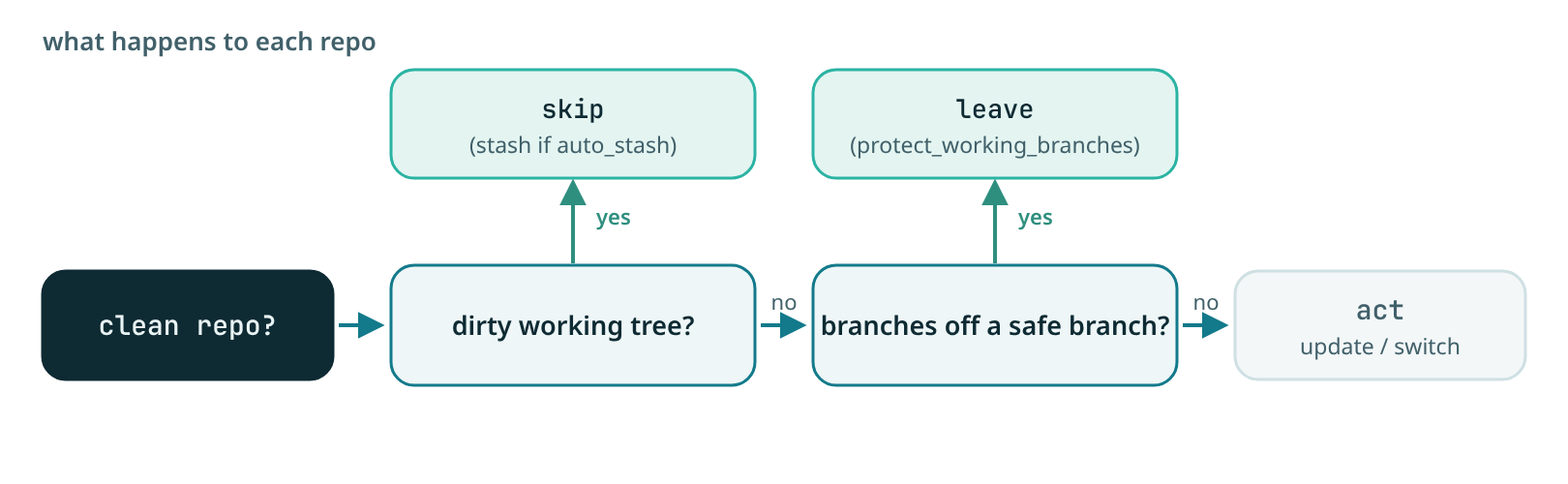
The tool protects your local work without getting in your way. The guiding rule:
a clean repo is always safe to act on, the branch name alone never causes a skip.
The only thing that blocks an update is a dirty working tree.
Safety checks#
- Clean Workspace Check (the main guard): detects a dirty working tree,
uncommitted, unstaged, or untracked changes. A dirty repo is skipped by both
updateandbranchesso local work is never clobbered. - Automatic Stashing: optionally stashes a dirty tree so
updatecan proceed instead of skipping. - Working-Branch Protection (applies to
branchesonly): keeps thebranchescommand from switching a repo off a branch outsidesafe_branches, so you are never moved off a feature branch you are working on. This does not affectupdate, a clean feature branch is still pulled.
Configuration#
| Setting | Description | Default |
|---|---|---|
require_clean_workspace |
Skip repos with a dirty working tree (the main guard) | true |
protect_working_branches |
Keep branches from switching a repo off a non-safe branch |
true |
safe_branches |
Branches the branches command may switch away from |
main,master,develop,development |
auto_stash |
Stash a dirty tree before update instead of skipping |
false |
branch_strategy |
How branches picks the most-active branch: hybrid (60% commits + 40% recency), commits, or recency |
hybrid |
Behavior#
update (fetch + fast-forward the current branch):
- A clean repo is updated on whatever branch it is on, feature branches included.
- A repo with a dirty working tree is skipped (or stashed first, if
auto_stashis on).
branches (switch to the most active branch):
- A repo with a dirty working tree is skipped.
- With
protect_working_branches = true, a repo on a branch outsidesafe_branchesis left where it is instead of being switched away.
Example scenarios#
Scenario 1: Working-Branch Protection (branches command)#
# Repository is on feature/my-feature branch (not in safe branches)
contextlake branches

# Output:
# [2026-06-16 10:00:00] ⊘ backend/services/api-gateway: Skipped branch switch (on working branch: feature/my-feature)
A plain
contextlake updatewould instead pullfeature/my-featurehere, since the working tree is clean.
Scenario 2: Uncommitted Changes#
# Repository has uncommitted changes
contextlake update

# Output:
# [2026-06-16 10:00:00] ⊘ backend/services/api-gateway: Skipped (unsafe: Uncommitted changes detected)
Scenario 3: Auto-Stash Enabled#
# Repository has uncommitted changes, auto-stash enabled
contextlake --auto-stash update

# Output:
# [2026-06-16 10:00:00] ⚠ backend/services/api-gateway: Changes stashed successfully
# [2026-06-16 10:00:00] ✓ backend/services/api-gateway: Updated main
Customization#
You can customize branch safety behavior via configuration or CLI:
# In .contextlake.ini
[contextlake]
protect_working_branches = true
safe_branches = main,master,develop,staging
require_clean_workspace = true
auto_stash = false
# Or via CLI
contextlake --safe-branches main,master,develop,staging --auto-stash update
Disabling safety checks#
If you want to disable safety checks (not recommended for production workflows):
# Disable all safety checks
contextlake --no-protect-working-branches --no-require-clean-workspace update
Warning: Disabling safety checks can lead to conflicts, lost work, or corruption of your local branches. Only disable if you understand the risks.
Scheduling and automation#
Prerequisites for cron jobs#
Before setting up cron jobs, ensure you have:
- Configuration file set up: Create
~/.contextlake.iniwith your settings
bash
   cp .contextlake.ini ~/.contextlake.ini
   # Edit with your work_dir and gitlab_group
   nano ~/.contextlake.ini
- Absolute path to script: Cron requires absolute paths
bash
   which python3  # Note the path
   # Example: /usr/bin/python3
- Test the command manually first:
bash
   cd /home/user/work && contextlake sync
Basic daily sync#
Run a full synchronization daily at 2 AM:
# Edit crontab
crontab -e

# Add the following line (replace paths as needed)
0 2 * * * cd /home/user/work && /usr/bin/contextlake sync >> /tmp/contextlake.log 2>&1
Note: This uses the configuration from ~/.contextlake.ini. No need to specify work_dir or gitlab_group in the cron command.
Hourly updates (no branch switching)#
Update repositories hourly without changing branches (for CI/CD environments):
0 * * * * cd /home/user/work && /usr/bin/contextlake update >> /tmp/gitlab_hourly.log 2>&1
Weekly full sync with branch management#
Run full sync including branch switching weekly on Sunday at 3 AM:
0 3 * * 0 cd /home/user/work && /usr/bin/contextlake sync >> /tmp/gitlab_weekly.log 2>&1
Multiple workspaces#
For multiple workspaces, use separate config files:
# Create workspace-specific config files
cat > ~/.contextlake_primary.ini << EOF
[contextlake]
work_dir = ~/work
gitlab_group = example-group-primary
EOF

cat > ~/.contextlake_secondary.ini << EOF
[contextlake]
work_dir = ~/Projects/Secondary
gitlab_group = example-group-secondary
EOF

# Add to crontab

# Sync primary workspace daily
0 2 * * * cd /home/user/work && /usr/bin/contextlake --config ~/.contextlake_primary.ini sync >> /tmp/gitlab_primary.log 2>&1

# Sync secondary workspace every 6 hours
0 */6 * * * cd /home/user/work && /usr/bin/contextlake --config ~/.contextlake_secondary.ini update >> /tmp/gitlab_secondary.log 2>&1
Monitoring and alerts#
Add email notifications for failures:
# Create a wrapper script
cat > /home/user/scripts/contextlake_wrapper.sh << 'EOF'
#!/bin/bash
cd /home/user/work
contextlake sync >> /tmp/contextlake.log 2>&1
EXIT_CODE=$?

if [ $EXIT_CODE -ne 0 ]; then
    echo "GitLab sync failed with exit code $EXIT_CODE" | mail -s "GitLab Sync Failure" [email protected]
fi
EOF
chmod +x /home/user/scripts/contextlake_wrapper.sh

# Add to crontab
0 2 * * * /home/user/scripts/contextlake_wrapper.sh
Log rotation#
To prevent log files from growing indefinitely, set up log rotation:
# Create logrotate configuration
sudo cat > /etc/logrotate.d/contextlake << 'EOF'
/tmp/contextlake.log {
    daily
    rotate 7
    compress
    delaycompress
    missingok
    notifempty
    create 0644 user user
}
EOF
Troubleshooting#
| Symptom | What to do |
|---|---|
| "Cache file not found" | Run contextlake fetch first to populate the projects cache. |
| "Permission denied" during cloning | Make sure glab is authenticated (glab auth login) and you can reach the repositories. |
| "Timeout" errors | Raise the relevant *_timeout settings, check connectivity, or lower max_workers (set it to 1 to run serially). Behind a TLS-inspecting proxy, set GITLAB_TOKEN so enumeration uses the built-in HTTP client. |
| "Detached HEAD" states | Handled automatically, the repo is skipped for pulls rather than failing. |
Nested .git directories |
A repo cloned into a subfolder of itself. contextlake verify flags it; fix by moving the inner tree up one level and removing the empty folder. |
| Cron job not running | Check crontab -l, use absolute paths, and test the exact command in a shell first; inspect cron logs (grep CRON /var/log/syslog). See Scheduling and automation. |
| Large log files | Set up log rotation, see Scheduling and automation. |
Best practices#
- Initial Setup: Run
contextlake synconce to set up full workspace - Regular Updates: Use
contextlake updatefor frequent, fast updates - Branch Management: Run
contextlake branchesperiodically to stay on active branches - Monitoring: Check logs regularly for errors or failures
- Backup: Commit workspace state to git before major branch switches
- Testing: Test cron commands manually before adding to crontab
- Documentation: Keep this documentation updated with any custom configurations