Visualize the graph
Draw bounded, offline graph slices (`contextlake kb graph`) in any of 11 formats, HTML, DOT, JSON, GraphML, Cypher and six Mermaid diagram types, plus the composed namespace C4 diagram.

contextlake kb graph draws a bounded slice of the graph. The whole thing (hundreds of thousands of
nodes) is far too large to render, so every view is scoped from a seed and capped:
contextlake kb graph --overview --open # repos-as-nodes: the architecture map
contextlake kb graph --name CatalogService --kind class # a symbol's neighbourhood (default 2 hops)
contextlake kb graph --node <id> --hops 3 # expand around an exact node id
contextlake kb graph --search "payment" --open # seed from a full-text search
contextlake kb graph --repo acme/catalog-api # one repo's internal code graph
flowchart LR A(["contextlake kb graph"]) --> S1["--node / --name / --search
walks outward: --hops,
--relation, --direction"] A --> S2["--repo, one repo,
no outward walk"] A --> S3["--overview, the fleet,
--max-nodes alone"] S1 --> B["every view is capped, and
whatever is dropped is logged"] S2 --> B S3 --> B B --> F["--format"] F --> H(["html, the self-contained
offline page"]) F --> M(["six Mermaid formats,
for a PR or a design doc"]) F --> X(["dot, graphml, cypher, json,
for Graphviz, Gephi, Neo4j"])
Which seed you pick decides which flags apply at all: only a seeded view walks outward, so --hops,
--relation and --direction have nothing to do on --repo or --overview. sequencediagram
applies that rule in the other direction: it needs exactly one seed, so it is the one format --repo
and --overview cannot produce.
contextlake kb graph --repo <repo> renders one repo's internal code graph to a single self-contained HTML
page: nodes coloured by kind and sized by degree, edges by relation, with an in-page layout switcher,
search, and a minimap; it opens straight from file://:
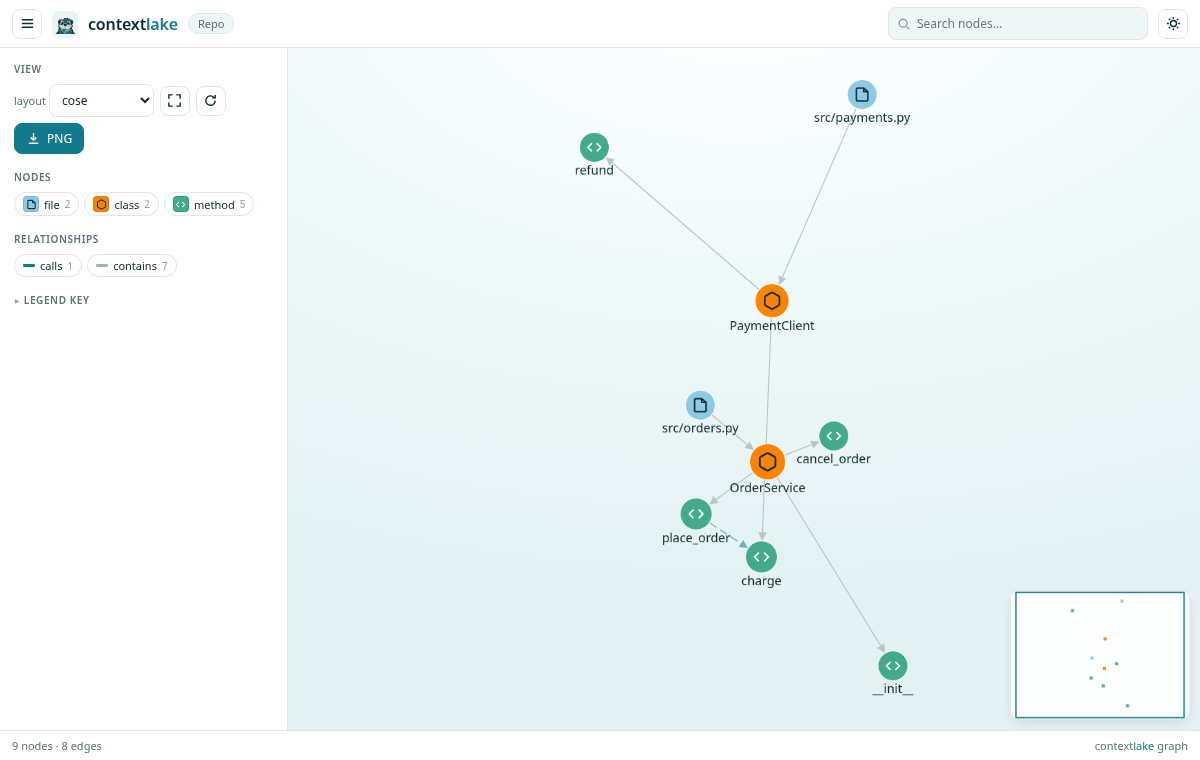
Seed with one of --node / --name (+--kind) / --search / --repo / --overview. --limit (default
20) caps how many seed nodes a --name or --search match contributes, before the walk starts, and
the run logs how many matched when it trims. It is the knob for "this name matches 300 symbols and I
only want a view of the first few". Bound the result
with --max-nodes (500, or 5000 on --overview, which is a fleet inventory and defaults to loading
every repo so any of them is findable; it is a bound on the whole file: one-hop external
nodes are counted against it too, and links take a bounded share of whatever the repo's own nodes
leave unused), --max-edges (--repo views only, see the mode list below; no cap by default,
which is what the html and dot renderers want,
and 400 for the Mermaid-rendered formats mermaid / classdiagram / statediagram / erdiagram /
deploymentdiagram -- a dense repo can
pack well over 500 edges into 500 nodes, which used to exceed Mermaid's own render limit and fail outright;
capping edges there means a --repo view always renders, possibly truncated, never errors. A seeded
Mermaid view gets no edge cap, so it can still exceed that limit and fail; narrow it with --hops or
--max-nodes instead), and --max-fanout (a per-node cap that
stops hub nodes from exploding: 50 on a seeded view, uncapped on a --repo view unless you
pass it, since capping containment fan-out by default would hide a file's own symbols), whatever
is dropped is logged, never silently truncated.
--hops (default 2), --relation and --direction {in,out,both} shape the walk, so they apply
to the seeded modes (--node / --name / --search) only. --overview and --repo do not walk
outward from a seed, so passing those three with either of them has no effect. What each mode does
take: a seeded view, all of them except --max-edges, which the seeded path never receives, so it is
accepted and then ignored; --repo, --max-nodes / --max-edges / --max-fanout;
--overview, --max-nodes alone.
For a --repo view over --max-nodes, which nodes
survive the cut is ranked by degree (highest-connected nodes kept first, ties broken by node id)
rather than an arbitrary node-id order, so a truncated diagram keeps the most connected part of the repo
instead of whatever happened to sort first. Degree alone is not the whole rule: every kind present in
the view is guaranteed a small floor of slots first, because pure degree ranking starved the rare kinds
completely (on one measured repo it kept 0 of 412 table and 0 of 402 resource nodes), which made
erdiagram and deploymentdiagram render empty for a repo that plainly had the data. On the
dashboard, a repo too large to show in one diagram is auto-narrowed to its largest module, recursively
and to any depth, with a clickable breadcrumb back out and a "Narrow further..." picker, instead of an
arbitrary slice (see The dashboard).
Output formats#
Output is chosen with --format:
html(default), a single self-contained, offline page (cytoscape.js is inlined, so it opens fromfile://with no network, handy air-gapped / behind a proxy). Nodes are coloured by kind and sized by degree; edges are styled by relation/confidence with their labels hidden until you click a node (so the view stays readable). Pan, zoom, drag, and a layout switcher (cose,concentric,breadthfirst,circle,grid,dagre) in the page, set the initial one with--layout.dagreis a preview: it is layered and directed rather than organic, and below 400 nodes it renders each node as an HTML card instead of a dot.--openlaunches the browser;--cdnproduces a small online-only file instead, and applies to--siteas well as the single-file export.dot, Graphviz (contextlake kb graph ... --format dot | dot -Tsvg > g.svg).mermaid, the relation graph, pastes into Markdown / GitHub.classdiagram, a Mermaid UML class diagram for a repo (or a seeded slice): classes / interfaces / structs with their methods as members, andinheritsedges as inheritance arrows (<|--extends,<|..implements). Great for a PR or design doc:contextlake kb graph --repo acme/app --format classdiagram.sequencediagram, a Mermaid call-order trace from one seeded function, each caller's callees ordered by call-site line, the order they actually appear in the source:contextlake kb graph --name process_order --format sequencediagram. Needs exactly one seed (--node/--name/--search, not--repo/--overview; there's no single obvious ordering across unrelated seeds), and depth follows the view's own--hops. Recursion/cycles stop cleanly (a function already on the current call path isn't re-entered) instead of hanging.statediagram, a Mermaid entity state machine: guarded assignments to a status/state/stage field (if order.status == Created: order.status = Paid) become transitions, labeled with the method that makes them. Only guarded transitions are emitted: the source state must be established by a preceding comparison on the same field, so a diagram never claims a transition the code doesn't actually establish (an honest undercount, not a guess). Best with--repo, likeclassdiagram:contextlake kb graph --repo acme/app --format statediagram. A--name/--nodeseed can reach the state nodes (via the file that declares them) but not their transitions past the view's--hops; use--repofor the full picture. Multiple entities in view each get their own composite block; a single-entity view renders flat.erdiagram, a Mermaid ER diagram oftable/viewdefinitions and their foreign-keyreferencesedges, from the SQL DDL extractor (see Index & Code Graph):contextlake kb graph --repo acme/app --format erdiagram. No attribute/column data (the extractor only capturesCREATE TABLE/VIEWnames and FK targets), so entities render as bare boxes with relationship lines, not column lists. AREFERENCESclause always points child-row to parent-row, so the parent is drawn on the "one" side of the notation. Only sees raw.sqlDDL, an ORM-defined schema (SQLAlchemy, Entity Framework, TypeORM model classes, no literalCREATE TABLEtext anywhere) renders an empty diagram with guidance, not a bug.deploymentdiagram, a Mermaid flowchart of Terraform/HCLresource/data/moduledefinitions grouped by an inferred category (network/compute/storage/database/security/other/module; a resource type matching none of the keyword lists lands inotherand gets its own subgraph), from the HCL extractor (see Index & Code Graph):contextlake kb graph --repo acme/infra --format deploymentdiagram. Category is a keyword heuristic over the resource type prefix (e.g.aws_security_group.web-> security);depends_onedges reconstructed fromvar./module./ type-name interpolation references draw the connections between resources. A single-category view renders flat (no subgraph wrapper). Terraform-only (HCL is the only IaC language the extractor parses): a repo with no.tffiles renders an empty diagram with guidance, not a bug.graphml, the standard GraphML interchange format for Gephi/yEd:contextlake kb graph --repo acme/app --format graphml --output g.graphml. Nodes/edges carry real attributes (kind, name, repo, file, line, lang / relation, confidence, weight) as GraphML<data>keys, so Gephi's own filter and color-by-attribute tools work directly against them, not just a bare shape.cypher,CREATEstatements for a Neo4j/FalkorDB import:contextlake kb graph --repo acme/app --format cypher --output g.cypher, thencypher-shell -f g.cypher(or FalkorDB's own loader). Node labels come fromkind, relationship types fromrelation, both backtick-quoted (contextlake's kind/relation vocabularies are open text, not a fixed enum, so quoting handles arbitrary values without a lossy sanitization pass into PascalCase/UPPER_SNAKE).json, the raw{nodes, edges, meta}for cytoscape / custom tooling (Gephi/yEd users want--format graphmlinstead, real typed attributes, not a bespoke shape to parse).
For interactive exploration of a large graph, contextlake kb graph --serve runs a local web UI where
clicking a node expands it (fetches its neighbours on demand) so you can walk the graph without
pre-rendering all of it. With --overview it serves something larger: the whole cross-linked site,
overview plus a page per repo, each repo page rendered on demand rather than pre-built, which is the
live counterpart of --site. It binds --host (default 127.0.0.1) and --port (default 8765), so
with no flags it is at http://127.0.0.1:8765. Like the dashboard, it answers a request only when the
Host header names the
address it was bound to (--host) or localhost, port included, that pinning is what stops a page on
an attacker domain that re-resolves to 127.0.0.1 from reading your graph cross-origin. Bind the address
you intend to browse rather than a wildcard (see dashboard.md).
Composed namespace C4 diagram#
contextlake kb graph --c4 renders a different kind of view: a composed C4-Context/Container diagram over
the whole fleet, namespaces are the boundaries, repos are the containers inside them, and the aggregated
depends_on, HTTP flow, and event flow edges become the labeled inter-service connections (grouped by
flavor and weight, e.g. http x3). It renders graph data that index/connect already extracted, so it
runs fully offline and adds no new extraction pass. --group-depth N (default 1) controls how deep into
the namespace path the boundaries are drawn, and --repos <glob> scopes the diagram to matching repos.
Because it only draws coupling the graph already resolved (weight-ranked), it doesn't invent links, and
folding event-flow in alongside HTTP keeps it from telling an HTTP-only half story:
contextlake kb graph --c4 --group-depth 2 --open # HTML, open in the browser
contextlake kb graph --c4 --format dot > c4.dot # clustered DOT, copy-pasteable
Output is chosen with --format: html (default, an interactive page with namespace boundaries as
compound nodes, written to <store>/graphs/c4.html), dot (Graphviz clustered DOT with subgraph
cluster_* boundaries), or json (the raw payload). --format mermaid, classdiagram, sequencediagram,
statediagram, erdiagram, and deploymentdiagram aren't supported with --c4 (the command exits
with an error), and --serve doesn't apply either, the C4 view is a generated file, not a live server.
--format graphml and --format cypher are neither rejected nor honoured: --c4 falls through to the
HTML renderer and, because the output path is only defaulted for --format html, prints that HTML to
stdout. Pass --output <path> if you hit it, and use dot or json for a real C4 export.
C1: external systems#
--c4 --c1 adds a layer on top of the same view: one dashed box per distinct host an indexed repo
calls over HTTP that never resolves to any indexed repo's exposed route, connected by a
calls_external x<weight> edge, drawn outside every namespace boundary:
contextlake kb graph --c4 --c1 --group-depth 2 --open
Deliberately unclassified. contextlake can't tell a genuine third-party dependency (Stripe,
GitHub's API) apart from an internal service this fleet simply hasn't indexed yet, both look
identical here: an HTTP call whose target path matches no indexed repo's exposes route. Read the
box labels yourself; you'll recognize your own internal hosts. --c1 requires --c4 (it has no
meaning on its own) and needs no new extraction pass, the host was already captured at index time,
just never used until this view asks for it.
