

Asking the graph
Search the graph from the terminal, trace what a change would break, and find who to ask: kb query, kb impact, and kb owners.

On this page
Who this is for: developers who want an answer from the terminal about where a symbol lives, what breaks if it changes, or who to ask.
Three commands answer the questions the graph exists for: kb query finds a symbol, kb impact
finds what breaks if you change it, and kb owners finds who to ask about it. All three print a
citation you can open, all three take --json, and none of them needs an editor or an MCP client.
The same three answers reach an agent over MCP as search_code / semantic_search /
hybrid_search, blast_radius, and who_knows; see
Serving over MCP. This page is the terminal-side equivalent.
flowchart LR
  G[("the graph")] --> Q["kb query"]
  G --> I["kb impact"]
  H[("git history")] --> O["kb owners"]
  Q --> QA(["where is it?"])
  I --> IA(["what breaks if I change it?"])
  O --> OA(["who do I ask about it?"])
The split on the left: query and impact read the store, owners reads
git history, which is why it answers in a directory that was never indexed. Give it a repo id rather
than a path and it does open the store, only to find the clone.
Prerequisites#
- A store with an indexed repo in it: Indexing the code graph, or
contextlake bootstrap.kb ownersis the exception, it reads git directly and needs neither. - For
--retriever semanticorhybrid, acontextlake kb embedrun as well: Searching semantically.
Important
Query an empty store and you get No matches, exit 0, the same first line as a genuine miss.
Opening the store creates it if it is absent (SqliteStore.__init__ in
src/contextlake/kb/store/sqlite_store.py runs mkdir(parents=True, exist_ok=True) and applies a
CREATE TABLE IF NOT EXISTS schema), so a store you never indexed answers as if it were built.
- Text mode adds a second line,
This store is empty (no repositories indexed), with the store path. The usual cause is the right command against the wrong store. --jsonadds nothing. The output is[], so a script cannot tell an empty store from a miss.
Run contextlake doctor if the counts look wrong; it reports the store's real node and edge
totals.
Find something: kb query#
contextlake kb query "ForecastService"
contextlake kb query ingest --kind method --repo acme/sensor-ingest
contextlake kb query "how do we ingest a reading" --retriever semantic
contextlake kb query ingest --repo acme/sensor-ingest --as-of a1b2c3
Each hit prints as repo · file:line · kind · name, so every result is a place you can open.
| Flag | What it does | Default |
|---|---|---|
--kind KIND |
Only nodes of this kind (function, class, table, …) |
all kinds |
--repo REPO |
Only this repository. An id that is not indexed exits 1 and names the ids to try |
all repos |
--limit N |
Most results to print | 20 |
--retriever fts\|semantic\|hybrid |
Which retrieval mode to use | fts |
--as-of COMMIT |
Search a repo's snapshot at a previously-indexed commit (needs --repo) |
latest |
--json |
A JSON array on stdout; every log line moves to stderr | off |
The three retrieval modes, and which to reach for#
| Mode | How it matches | Good for | Bad at |
|---|---|---|---|
fts (default) |
SQLite FTS5 over node name, qualified name and file, as prefix terms | a name you know, or its first few characters | a description of what the code does |
semantic |
nearest neighbours in embedding space | "how do we ingest a reading", where you have the idea and not the name | an exact rare identifier |
hybrid |
semantic seeds, then a Personalized PageRank rerank over the graph | most real questions | nothing in particular, it is the slowest of the three |
fts is prefix search, not substring search. Each word you type becomes a quoted prefix term,
so Forecast finds ForecastService and Service does not
(_fts_query in src/contextlake/kb/store/sqlite_store.py). Multiple words are an implicit AND of
prefix terms. That is the single most common reason a query that "should" match comes back empty.
Semantic and hybrid degrade to fts and do not fail, and say so (on stdout in text mode,
on stderr with --json). That happens when there is no embedder configured, the vector store cannot
be opened, or the vector store is empty (src/contextlake/kb/cmds/query.py, the
_semantic_results fallbacks).
On an empty vector store the notice is Semantic search cannot answer: no vectors are stored, so
semantic search has nothing to search -- runcontextlake kb embedfirst. Showing fts results
instead. With --repo, a repo that has no vectors while others do gets a notice that names that
repo. When you see either notice, the hits after it are fts hits and contextlake kb embed has
not covered the store (or that repo) yet.
--kind is applied differently per mode. On fts it is part of the SQL, so --limit 20 gives
you up to 20 matching nodes. On semantic and hybrid it is a filter applied after the search:
- The search looks at 10 times
--limitnodes (at least 200, at most 512, or--limititself when that is larger), keeps the ones of that kind, and cuts to--limit. --retriever semantic --kind function --limit 20can still return fewer than 20 functions, and a node of that kind ranked past the window is not found.- When nothing of that kind is in the window, the output says how many nodes it looked at.
hybridstarts from the 20 nearest vectors and their graph neighbours, so a node of that kind outside both is not found either.
--as-of is a different search, not the same search over old data. It reads the repo's stored
shard for that commit and matches with a case-insensitive substring test, so it neither uses FTS nor
honours --retriever. It needs --repo, because history is kept per repository.
With --as-of, a --repo that names nothing indexed gets the same Unknown repo answer as a
search without it: exit 1, the ids that match (or a note that the store holds none), and
"error": "unknown_repo" under --json. A repo that is known but has no snapshot at that commit
prints No indexed snapshot and exits 1.
Verification#
contextlake kb query ForecastService --limit 3
You should get up to three lines shaped like
demo/app · src/forecast.py · class · ForecastService. If you get
No matches for 'ForecastService', check the index is populated with contextlake doctor before
suspecting the query.

See what breaks: kb impact#
contextlake kb impact ingest
contextlake kb impact ingest --repo acme/sensor-ingest --hops 2
contextlake kb blast-radius ingest --json          # the same command
$ contextlake kb impact ingest --repo acme/sensor-ingest --hops 2
Impact of changing Ingest (acme_sensor_ingest_ingest): 1 affected node(s) within 2 hop(s)
  seed: method src/Ingest.cs
  h1  acme/sensor-ingest:SensorGateway  (class, src/SensorGateway.cs)  via calls at src/x:1  [extracted]
| Flag | What it does | Default |
|---|---|---|
--repo REPO |
Disambiguate a symbol defined in more than one repo | none |
--hops N |
How many reverse hops to walk | 3 |
--limit N |
Most affected nodes to list | 100 |
--json |
A JSON object on stdout | off |
impact walks the graph backwards. It follows edges into the node you named, so it answers
"what depends on this", not "what does this depend on".
Seven relations are traversed by default: calls, depends_on, inherits, references,
reads, writes and uses. See DEFAULT_RELATIONS in src/contextlake/kb/impact.py.
There is no CLI flag to change that set. The MCP blast_radius tool takes a relations argument
if you need a different walk.
transitions_to is deliberately left out of the default set. See
Entity state machines.
Each affected node is reported once, at the first hop that reached it, with the relation it came
through and that edge's confidence. Incoming edges are visited highest-confidence first
(EXTRACTED, then INFERRED, then AMBIGUOUS), which is what makes a truncated result still worth
reading: when --limit is reached the whole walk stops, so what you get is a bounded slice of the
most trustworthy edges rather than an arbitrary prefix. The output says (truncated) when that
happened. There is no pagination; raise --limit instead.
Ambiguity is reported, not guessed at. This holds at two levels.
Within one repository, a name matching several definitions no longer silently takes the first. The
seed is named with its file:line and how many definitions competed for it, the first five
alternatives that were passed over are listed with their node ids (with a count of any beyond that),
every hit cites the call site the edge was read from,
and a footer counts how much of the answer rests on name-only matching:
Impact of changing close (contextlake_site_cmdk_js_close_113): 1 affected node(s) within 1 hop(s)
  seed: function site/cmdk.js:113 (3 matched 'close'; used the first)
        or: method src/contextlake/kb/store/base.py:27  --node contextlake_src_contextlake_kb_store_base_py_store_close_27
        or: method src/contextlake/kb/store/sqlite_store.py:221  --node contextlake_src_contextlake_kb_store_sqlite_store_py_sqlitestore_close_221
  h1  contextlake:site/cmdk.js  (file, site/cmdk.js)  via calls at site/cmdk.js:121  [ambiguous, 1 of 3 same-name definitions]
  1 of 1 hit(s) came from a reference matched by NAME across several same-named definitions; each caller may target a different one. Open the cited call site to confirm.
To ask about one of the alternatives instead, pass its node id as the argument, not as a flag:
contextlake kb impact contextlake_src_contextlake_kb_store_base_py_store_close_27
impact tries an exact node id before it tries anything else, so an id resolves to that one
definition and nothing else. (The --node prefix those lines are printed with is kb graph's
flag name; kb impact has no --node flag and will tell you so if you pass one.)
The footer is the part worth reading twice. AMBIGUOUS as a label read exactly the same on a
hand-verified answer where all eleven hits were real and on one carrying 282 false positives, so
the count is there to say what the label costs in this result: 3 of 3 means treat the whole
list as leads, 1 of 40 means the opposite.
A symbol defined in several repos makes impact say so,
name how many repos define it, list the candidates, and exit 1, so you can narrow it yourself:
  --repo acme/sensor-ingest     (class Reading)
  --repo acme/forecast-api      (struct Reading)
The candidate list stops at 10 repos even when the count in the line above it is higher.
Warning
A name that matches no node exactly falls back to a fuzzy search and takes the top hit, silently
(resolve_target in src/contextlake/kb/impact.py). A typo can produce a confident
blast radius for the wrong symbol. The header line always names the node that was
resolved, Impact of changing <name> (<node id>), so read it before trusting the list.
Verification#
contextlake kb impact <a symbol you know has callers> --hops 1
You should see ... : N affected node(s) within 1 hop(s) followed by h1 lines. A symbol with no
dependents prints nothing depends on it within 1 hop(s) and exits 0; that is a real answer, not
a failure.
Find who to ask: kb owners#
contextlake kb owners acme/sensor-ingest                    # the whole repo
contextlake kb owners acme/sensor-ingest --path src/gateway  # one sub-tree
contextlake kb owners .                                  # a directory on disk, no index needed
contextlake kb who-knows acme/sensor-ingest --json          # the same command
$ contextlake kb owners acme/sensor-ingest
Owners / SMEs for acme/sensor-ingest (recency-weighted):
  1. Ada Rowan: 2 commit(s), 14 line(s), last 2026-09-01, 43%
  2. Ben Okafor: 1 commit(s), 16 line(s), last 2026-07-14, 38%
  3. Chen Wei: 1 commit(s), 6 line(s), last 2026-08-18, 18%
| Flag | What it does | Default |
|---|---|---|
--path SUBDIR |
Rank contributors to this sub-tree only | the whole repo |
--limit N |
Most owners to list | 10 |
--json |
A JSON object on stdout | off |
Give it a path that exists on disk and it never opens the store at all, so
contextlake kb owners . works on a machine that has never indexed anything. Give it a repo id
and it looks that id up in the store to find the clone; an id it does not know exits 1 and
suggests close matches.
How the ranking works#
Each contributor's score is
sum over their commits of (lines_changed + 1) * 0.5 ** (age_days / 180)
(src/contextlake/kb/ownership.py, HALFLIFE_DAYS = 180.0). Three consequences worth knowing:
- Volume and recency both count. The
+ 1means a commit scores even when it changed no countable lines, so a prolific reviewer of small changes still ranks. - Age is measured from the newest commit in the history examined, not from today. An archived repo still returns a sensible ranking of who was active within that repo's own timeline, and the answer does not drift as time passes.
--pathmoves that baseline too, because the newest commit is recomputed over only the commits touching that path.
The printed percentage is each contributor's share of the total score, not a share of commits. Contributors are aggregated by email where there is one, and shown under the name on their most recent commit.
Note
owners reads history from the root of a git checkout only. A folder inside another repo ranks
nothing, because git would report the outer repo's authors. Use --path for a sub-tree.
- It first runs
git log --no-merges --numstat --since="2160 days ago". If that finds no commits, it walks the whole history, so a dormant repo still gets owners. - Each walk has a 30-second limit. A timed-out walk is not retried. It logs
owners: git
  history for <repo> could not be read within 30s
, thenThis is a timeout, not an empty history. - With
gitmissing from PATH, it logsowners: git could not be run for <repo>, so no owners are reported. - An empty result prints
No commit history found for <scope>: <reason>and exits0. The reason says either that git could not be asked (gitmissing, not a checkout root, or no repository or no commits yet) or that it read the history and matched nobody.
Verification#
contextlake kb owners . --limit 3
In any git repository with history you should get Owners / SMEs for <dir> (recency-weighted):
followed by up to three numbered lines ending in a percentage.
Scripting these commands#
--json on any of the three prints the result on stdout and moves every human line to stderr, so
contextlake kb query foo --json | jq is safe. The shapes differ per command:
| Command | Top-level JSON | Notes |
|---|---|---|
kb query |
an array of hits | keys repo, file, line, kind, name, qualified_name. No score field |
kb impact |
an object | target (with file/line), hops, truncated, ambiguous, other_definitions[], affected[]; each hit carries id, file, line, via_file, via_line, name_candidates. confidence is lower-case |
kb owners |
an object | repo, path, owners[], ranking_gap; email and raw score are not included |
Four behaviours that bite scripts:
- An empty result is exit
0, in all three. Test the payload, not the exit code, to detect "found nothing". Exit2means you gave no search term; exit1means the target could not be resolved, or--reponames no indexed repository. A repo id is theoriginremote (github.com/acme/app) orname@<root commit>, not the directory name; the message names the ids that match. - An empty
ownerslist does not mean nobody committed.ranking_gapisnullwhenownershas rows. When it is empty,ranking_gapsays why: the clone directory is not there, the path is not its own git checkout, git could not be run, or git read the history and matched nobody. The text form prints the same reason. --limit 0and--hops 0are refused, with the argument error and exit2:--limittakes 1 to 1,000,000 and--hopstakes 1 to 1,000. Zero used to be read as "unset" and quietly became the default, which is why it is now an error. Neither ever meant "no limit".- The
--as-ofargument check is the one error that ignores--json:--as-ofwithout--repoprints a plain line to stderr and exits2with no JSON error object.
The graph, on this page#
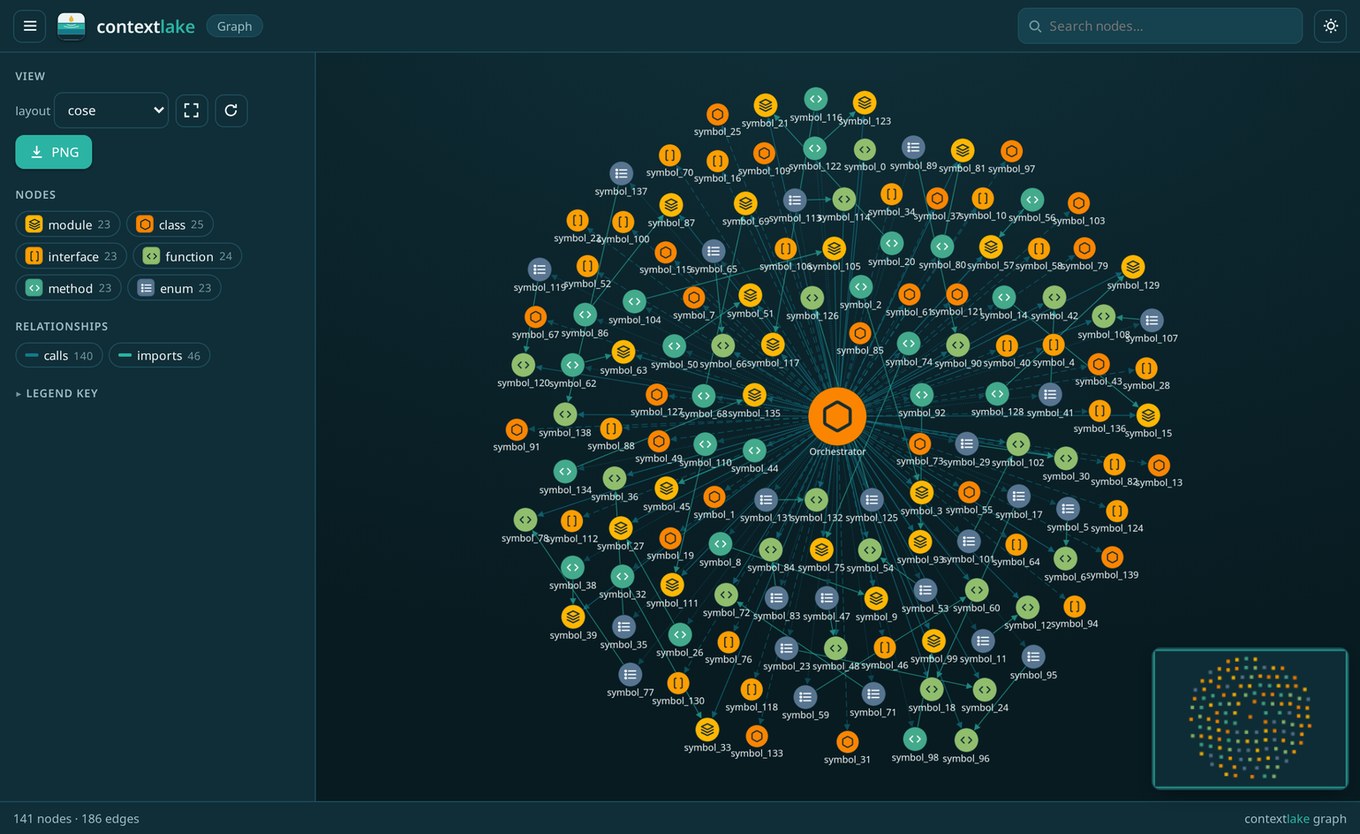
Every answer on this page comes out of the same graph you are looking at. Search a symbol, then follow its edges. It is the shipped visualizer, not a recording, and it runs offline with no network calls.
See also#
- Serving over MCP, the same answers as MCP tools
- Indexing the code graph, what the graph contains to be asked about
- Searching semantically, what
--retriever semanticneeds first - Using the dashboard, the same queries in a browser
- Console output, decoding a run