 contextlake
Model providers
The pluggable embeddings and wiki backends: auto, built-in CPU, Ollama, OpenAI, Anthropic, and agent-CLI, with data-sharing posture and setup.

Both the embeddings and wiki tiers are pluggable and take a provider, defaulting to "auto". Pick
by what may leave your machine and what hardware you have.
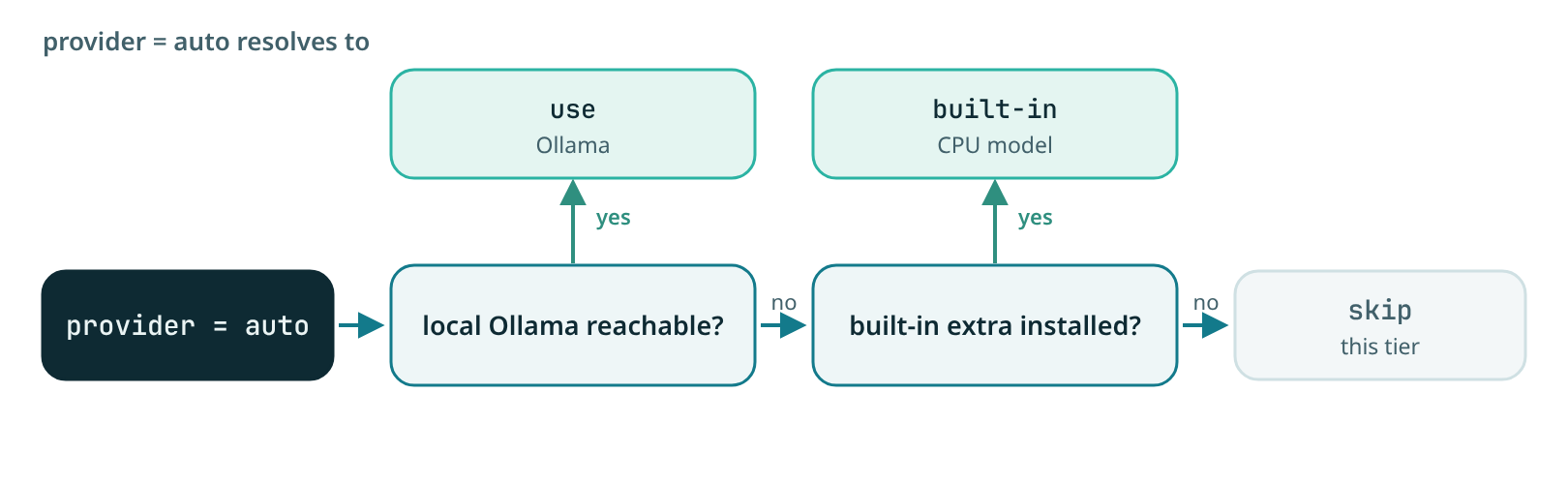
auto(default), resolves to a reachable local Ollama, else the built-in CPU model if its extra is installed, else it skips that tier. So the semantic/wiki tiers Just Work the moment you setenabled = true, with no daemon and no API key.builtin, a small model that runs in-process on CPU, auto-downloaded once tocache_dir(default~/.contextlake/models). Zero daemon, zero API key.- Embeddings,
engine = "model2vec"(default): staticpotion-base-8M(~30MB, MIT), numpy inference, very fast at scale,pip install "contextlake[kb-local]". Orengine = "fastembed": ONNXbge-small(~90MB, MIT, higher quality),pip install "contextlake[kb-fastembed]". - Wiki LLM, a
Qwen2.5-0.5B-InstructGGUF (Apache-2.0) viallama-cpp-python,pip install "contextlake[llm-local]". Fast to set up, but 0.5B is a modest writer (good for coverage, not polished prose) and CPU generation is slow (~4 calls/repo). Prefer Ollama at any real scale. See Why the built-in LLM needs a prebuilt wheel and How much does the model matter?. ollama, a local Ollama daemon (base_url, defaulthttp://127.0.0.1:11434), the recommended wiki backend: no Python native build, and a 3B-8B model writes markedly better pages than the built-in 0.5B. See Using Ollama for the wiki.openai, any OpenAI-compatible chat API (a hosted key, or a local server like LM Studio, Jan, llama.cpp, vLLM). Best prose, per-token cost. The key is read from the env var named byapi_key_env(defaultOPENAI_API_KEY), never stored in config.anthropic, the Anthropic Messages API (a hosted key). Best-in-class wiki prose and reliable structured council reviews. The key is read from the env var named byapi_key_env(defaultANTHROPIC_API_KEY), never stored in config.modelselects the tier: defaultclaude-opus-4-8; setmodel = "claude-haiku-4-5"or"claude-sonnet-5"for a much cheaper high-volume fleet run (the council makes many calls).max_tokens(default 4096) caps each response.cli, a locally-installed agent CLI you already pay for:claude,gemini, orcodex. contextlake shells out to it (command, defaultclaude;argsoverrides the per-CLI preset) and feeds the prompt on stdin. No API key touches contextlake; data goes to whatever provider that CLI uses. Reuses your subscription, offline-adjacent (still a network call by that tool), and mirrors how contextlake already shells out togitandglab.
Data-sharing posture per backend. Pick by what may leave your machine:
| Backend | Data leaves the machine? | Auth |
|---|---|---|
builtin / auto→builtin |
No: fully local CPU model | none |
ollama |
No: local daemon | none |
cli |
Yes: to whatever provider that CLI uses | reuses the CLI's own login |
anthropic / openai |
Yes: to the API endpoint | env-var key (never stored) |
Configuring the wiki LLM#
Two lines is enough (passing --llm on the CLI implies enabled = true), or set both in
~/.contextlake/kb.toml:
[llm]
enabled  = true
provider = "ollama"        # auto | builtin | ollama | openai | anthropic | cli
model    = "qwen2.5:3b"    # provider-specific model id (table below)
# base_url    = "http://127.0.0.1:11434"   # ollama, or a local openai-compatible server
# api_key_env = "OPENAI_API_KEY"           # openai: env var holding the key (never the key)
# timeout    = 300          # seconds per model call; raise it for a slow CPU (ollama/openai)
council_size = 3           # review lenses that run (1-3); fewer = fewer calls per page
accept_score = 0.7         # mean council score a page must clear to be written
| provider | example model |
notes |
|---|---|---|
builtin |
Qwen/Qwen2.5-0.5B-Instruct-GGUF |
a HF GGUF repo id; model_file picks the quant |
ollama |
qwen2.5:3b, llama3.1, llama3.2:3b |
must be ollama pulled first |
openai |
gpt-4o-mini, or your server's model id |
base_url = the API's /v1 |
CLI flags override the toml and now work on bootstrap too:
contextlake bootstrap --llm ollama --llm-model qwen2.5:3b.
Why the built-in LLM needs a prebuilt wheel (or a compiler)#
The builtin wiki model runs a GGUF model through
llama-cpp-python, Python bindings around llama.cpp, a
C++ inference engine. Native (C/C++) packages ship as prebuilt binary wheels, one per (OS, CPU,
Python version). Two consequences explain why an extra step is sometimes needed and why contextlake can't
do it for you:
- A dependency can't carry an index URL.
contextlake[llm-local]can only namellama-cpp-python; Python packaging (PEP 508) deliberately forbids pinning an--extra-index-urlin a package's metadata (for reproducibility and supply-chain safety). So contextlake cannot makepiplook anywhere but your configured indexes (PyPI by default), only yourpipcommand can add one. - PyPI lags brand-new Pythons. Wheels are uploaded per interpreter version; a just-released Python
(e.g. 3.14) often has no wheel on PyPI yet, so
pipfalls back to the source tarball and tries to compile, which needscmake+ a C/C++ compiler you may not have installed. That is the build failure you saw.
The maintainer also publishes a prebuilt CPU wheel index carrying wheels PyPI doesn't have yet, so pointing pip at it skips compilation entirely, no compiler needed:
pip install llama-cpp-python --extra-index-url https://abetlen.github.io/llama-cpp-python/whl/cpu
Belt-and-suspenders: --only-binary :all:. On a compiler-less machine, add this flag so pip refuses
to fall back to a source build for any package, you get a clean "no matching distribution" message
instead of a wall of cmake/compiler errors. :all: is the all-packages token (its opposite is
--no-binary). Combined with the CPU-wheel index, this installs the built-in LLM on a brand-new Python
with no toolchain:
pip install --only-binary :all: llama-cpp-python \
  --extra-index-url https://abetlen.github.io/llama-cpp-python/whl/cpu
The trade-off is deliberate: if a wheel genuinely doesn't exist for your platform, the command stops with an actionable error rather than attempting a build that can't succeed.
On a mainstream Python (3.10-3.13) none of this applies: pip install "contextlake[llm-local]" finds a
PyPI wheel and Just Works. It is specifically the bleeding-edge-interpreter case that needs the extra
index. The cleanest way to avoid the native build altogether is to use Ollama (below), a standalone
binary with no Python compile step.
Using Ollama for the wiki#
Ollama is a standalone local model server. It sidesteps the native Python build, and a 3B-8B model writes much better wiki pages than the 0.5B built-in.
A) Ollama inside WSL / Linux (simplest, localhost just works):
curl -fsSL https://ollama.com/install.sh | sh   # installs + starts the daemon
ollama pull qwen2.5:3b                            # ~1.9GB, one-time
contextlake bootstrap --llm ollama --llm-model qwen2.5:3b   # whole layer in one command
# or per repo:  contextlake wiki <repo> --llm ollama --llm-model qwen2.5:3b
contextlake defaults base_url to http://127.0.0.1:11434, so usually nothing else to set.
B) Ollama on Windows, contextlake in WSL (the cross-boundary case). WSL2 is a separate network
namespace, so a Windows Ollama bound to 127.0.0.1 is not reachable from WSL (localhost:11434 →
connection refused). Two fixes:
- Easiest, mirrored networking. In
%UserProfile%\.wslconfigadd:ini [wsl2] networkingMode=mirroredthenwsl --shutdownand reopen. Nowlocalhostis shared, so the defaultbase_url = "http://127.0.0.1:11434"works from WSL unchanged. - Or expose Ollama and use the host IP. On Windows set
OLLAMA_HOST=0.0.0.0(System Environment Variables) and restart Ollama so it listens on all interfaces; allow it through the Windows firewall. From WSL, the Windows host is your default-route gateway, not thenameserverin/etc/resolv.conf(that is a DNS stub):bash ip route show default | awk '{print $3}' # e.g. 172.24.224.1 (NOT 10.255.255.254) curl http://172.24.224.1:11434/api/tags # confirm reachabilitySetbase_url = "http://172.24.224.1:11434"in[llm](your IP will differ).
Pull the model on whichever side runs Ollama: ollama pull qwen2.5:3b.
How much does the model matter?#
The wiki's quality is bounded by the model behind it. The graph facts fed in are identical; the difference is how well the model turns them into prose (and the verification council rejects weak pages regardless, so a smaller model mostly means more rejections and blander accepted pages).
A measured A/B on one repo (contextlake, 1810 graph nodes, identical facts + 3-lens council) on a
CPU-only host (no GPU, e.g. WSL2 without GPU passthrough):
| model | where | speed | result |
|---|---|---|---|
built-in Qwen2.5-0.5B (GGUF) |
in-process CPU | fast enough | page written (~119 words), accurate but thin and generic |
Ollama qwen2.5:1.5b |
CPU (no GPU) | ~1.7 tok/s | timed out, a full page + reviews needs ~10 min/repo |
Ollama qwen2.5:3b |
CPU (no GPU) | ~0.85 tok/s | timed out, ~20 min/repo |
The lesson is about hardware, not model quality: a 1.5B-3B model writes better prose than the 0.5B, but on a CPU-only box it is too slow to finish a page in reasonable time (and, at fleet scale, wholly impractical). Those models shine when Ollama has a GPU, e.g. Ollama on a Windows host with a discrete GPU generates in seconds, not minutes. So:
- CPU-only, offline, quick: the built-in 0.5B, fast to set up, basic prose. Or a hosted API if quality matters and you accept per-token cost.
- GPU available (incl. Ollama on your Windows host): Ollama 3B-8B, the sweet spot for readable pages at fleet scale.
- Best prose regardless of local hardware: an API model (
openaiprovider).
If your local model is slow, raise the per-call timeout instead of letting every page fail silently:
timeout in [llm] (seconds, default 300):
[llm]
provider = "ollama"
model    = "qwen2.5:3b"
timeout  = 1200        # give a slow CPU room; default is 300s (5 min)
Notes: behind a TLS-inspecting corporate proxy the first built-in download needs your OS CA bundle
(export REQUESTS_CA_BUNDLE / SSL_CERT_FILE; see docs/releasing.md). Don't switch the embedder
model/dimension against an existing vector store without re-embedding from scratch, a guard refuses the
mismatch. The prebuilt Docker image (ghcr.io/sayak-sarkar/contextlake) bundles these models so nothing
downloads at runtime. See examples/kb.toml.example.